
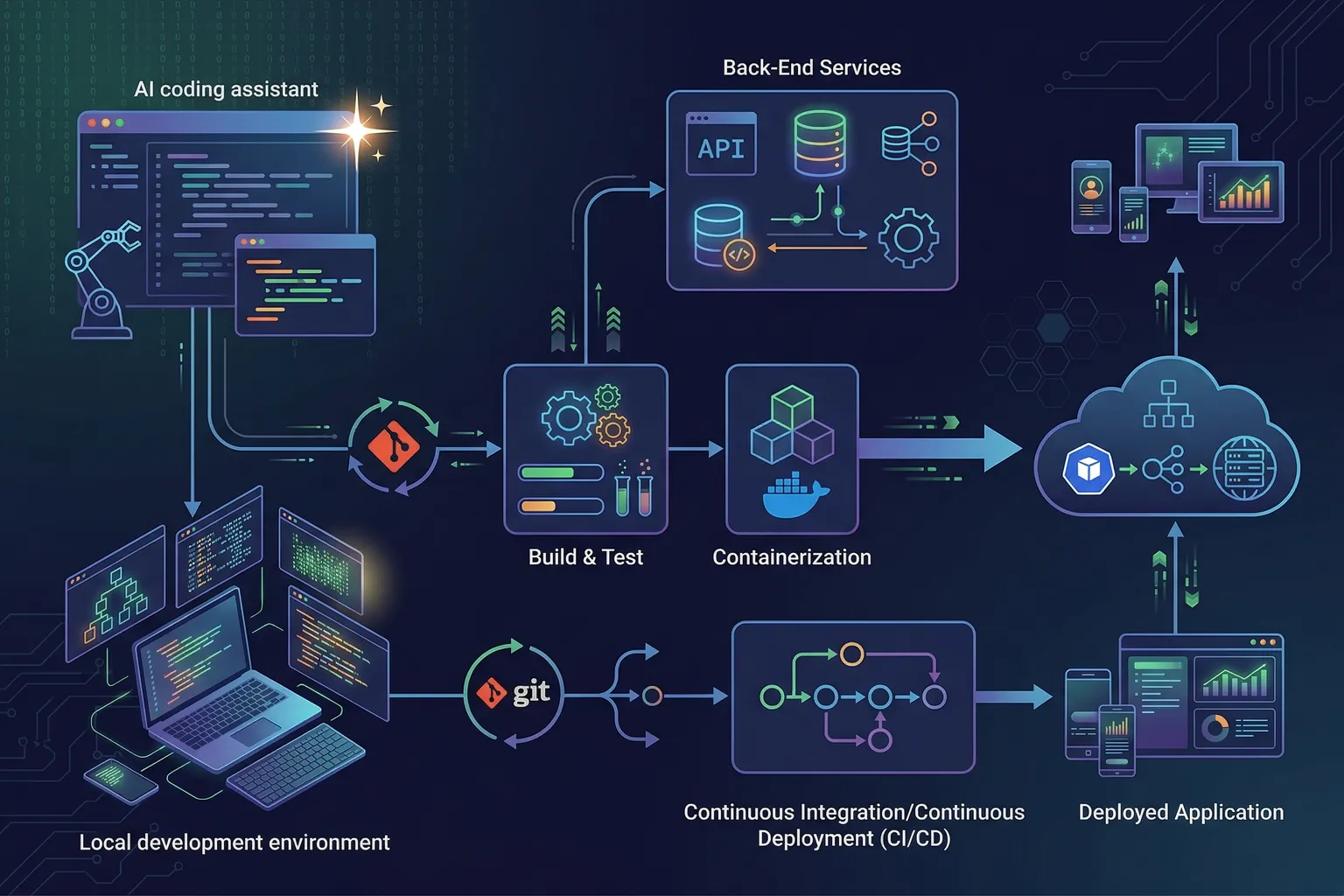
- AI coding tools genuinely accelerate full-stack development, but the workflow requires deliberate structure — dumping a feature request into a prompt and hoping is not the move.
- Replit Agent is excellent for scaffolding: use it to generate a running skeleton in 10 minutes, then move the code to a local environment for real development.
- Cursor Agent mode handles most of the implementation once you have a working scaffold. The key is giving it clear, scoped tasks rather than open-ended requests.
- AI fails most often on: complex state management, authentication edge cases, and anything requiring deep domain knowledge. Plan for human intervention on these.
- The final 20% of any app — error handling, edge cases, security hardening — still requires careful human review. AI will not catch everything.
Let me show you how I actually build full-stack apps with AI tools, not how the demos make it look.
The demos show a developer typing one sentence and watching a complete app materialize in 30 seconds. That’s real, but it’s the easy part. What the demos skip: how to handle it when the AI scaffolds an authentication system with a subtle JWT vulnerability. Or when it generates React components that work in isolation but break when composed together. Or when the database schema it chose will cause you pain in 3 months.
This guide covers the full process — including the parts where AI falls short.
The Project: A Task Management CRUD App
We’re building a task management app. Basic, yes, but it covers the full-stack surface area: frontend, backend API, database, and auth. Here’s the spec:
- User authentication (register, login, logout)
- Create, read, update, delete tasks
- Tasks have a title, description, due date, and status
- Users can only see their own tasks
- Simple React frontend, Node.js/Express backend, PostgreSQL database
This is the kind of thing you’d build as a starter project or a foundation for something more complex. Let’s go.
Phase 1: Use Replit Agent to Scaffold Fast (10-15 minutes)
My workflow: use Replit Agent to get a running skeleton quickly, then move the code to a local environment for real work. Replit’s browser-based environment eliminates the “get it running” friction.
The prompt I used:
Build a full-stack task management app with React frontend and Node.js/Express backend. Use PostgreSQL for the database. Include user authentication with JWT. Users can create, read, update, and delete their own tasks. Tasks have: title (required), description (optional), due_date, and status (todo/in-progress/done). Set up the database schema, API routes, and a simple React UI.
Replit Agent’s output in about 12 minutes:
- A working Express API with
/authand/tasksendpoints - A PostgreSQL schema with
usersandtaskstables - A basic React frontend with a login form and task list
- JWT-based authentication
Was it perfect? No. Immediately visible issues I found on review:
- JWT secret was hardcoded as
'secret'in the code. This is a critical security issue and the #1 thing AI tools get wrong on auth. - No input validation on the task endpoints — title length, date format, status values all unchecked.
- The React state management was a bit tangled — tasks and auth state were both in the top-level component, making it hard to extend.
But it was running. I had a browser tab with a login form, could register a user, and could create tasks. That’s 12 minutes of work to get to a testable skeleton. Worth it.
What to fix immediately:
Before moving on, fix the security issues. I opened Cursor, pointed it at the codebase, and asked:
Review the authentication implementation in this Express app for security issues. Look specifically at: JWT secret handling, token expiration, password hashing approach, and session management.
Cursor identified: the hardcoded JWT secret (which I’d already found), the absence of a token expiration claim, and that bcrypt was used for passwords but with a cost factor of only 8 (should be 10+). It generated the corrected implementation and I reviewed each change.
This review step is not optional. Always have AI or a human review auth code before you build on top of it.
Phase 2: Move to Local Development
Export the code from Replit, initialize a git repo, set up a local PostgreSQL instance. Standard stuff, no AI needed here.
One place AI is genuinely useful in setup: writing your environment configuration. I gave Cursor this prompt:
Create a
.env.examplefile for this project that documents all required environment variables. Include: DATABASE_URL, JWT_SECRET (with a note about minimum length and randomness requirements), PORT, and NODE_ENV. Also create a startup script that validates all required variables are set before the app starts.
The output was solid and saved me 15 minutes of boilerplate writing. The environment variable validation startup script is something I’d usually skip “just for now” and regret later.
Phase 3: Implement Features with Cursor Agent
Now the real development starts. The scaffold is running, security issues are fixed, and I have a local environment. Time to build features.
My approach: I give Cursor Agent specific, scoped tasks rather than open-ended feature requests. The quality difference is significant.
Bad prompt:
Add filtering and sorting to the task list.
Good prompt:
Add three filtering options to the task list: filter by status (todo/in-progress/done), filter by due date (overdue/due-today/upcoming/no-date), and a text search that matches on task title. Add a sort option: by due date (ascending/descending) and by created date (newest first). Implement filtering on the backend API (add query parameters to GET /tasks) and update the React component to pass the filter values as query parameters.
The specific prompt tells Cursor exactly what API changes to make, what query params to add, and what the React component needs to do. The AI doesn’t have to guess at scope or approach.
Cursor’s output: modified GET /tasks to accept status, dueDateFilter, search, and sortBy query parameters, updated the SQL query to handle each filter, and added a filter bar to the React component. All of it worked on the first run except for one thing: the SQL query for the due date filter had an off-by-one error in the “due-today” logic (the timestamp comparison was using < instead of <= for end of day). Minor fix, 2 minutes.
What Cursor is good at in this phase:
- Implementing features with clear specifications
- Writing database queries for standard patterns
- Adding endpoints that follow the existing code structure
- Writing React components that match existing patterns in the codebase
- Refactoring when you give it a clear target state
What Cursor struggles with:
Complex state management. When I added real-time task status updates (websocket-based), Cursor’s first implementation had a race condition in the React state updates when multiple tasks updated simultaneously. It took three iterations to get right, and I ended up directing each iteration manually rather than just rerunning the prompt.
This is the general pattern: give AI specific, well-scoped tasks and it’s fast and usually correct. Give it “add real-time features” without specifics and you’ll spend as much time correcting as you would building.
Phase 4: Testing with AI Assistance
I don’t skip tests. And AI has made writing tests significantly faster.
The prompt:
Write unit tests for the task API routes using Jest and supertest. Cover: creating a task (valid input, missing required fields, invalid status values), retrieving tasks (with and without filters), updating a task (valid update, updating another user’s task), deleting a task (own task, other user’s task). Use a test database seeded with known fixture data.
Cursor’s output: a comprehensive test file covering all the cases I specified. Twenty-three tests. How many passed on first run? Nineteen.
The four failures:
- Two tests failed because the test database connection used the production DATABASE_URL env variable instead of a test-specific one (configuration issue, not logic)
- One test failed on the “update another user’s task” case because it was checking for a 403 but the endpoint was returning 404 (both are reasonable, but the test and implementation disagreed on which was correct — I decided 404 was better for information hiding)
- One test had incorrect fixture data that put a task in a state that couldn’t be updated by the test operation
All four were quick fixes once I understood what was wrong. The 19 that passed on first run covered the critical paths correctly.
Writing those 23 tests manually would’ve taken 60-90 minutes. With Cursor, it took about 20 minutes (including reviewing and fixing the failures).
Phase 5: The Parts AI Won’t Nail
Let me be direct about where you should plan for human involvement.
Error handling: AI will add basic error handling. It often misses edge cases specific to your application. Review every error path manually and ask yourself “what happens if this fails at 3am and I’m asleep?” The AI didn’t imagine that scenario; you have to.
Performance: AI doesn’t naturally think about query performance. My Cursor-generated task list query was doing a full table scan on the tasks table. I added a query explain and found it — Cursor had not added the appropriate index. I asked Cursor to fix it after I found the issue, and it did. But it didn’t flag it proactively.
Security review: As mentioned, AI-generated auth code needs careful review. Beyond auth, check: are you validating that users can only modify their own resources at every endpoint? Is the API returning more data than the client needs? Are error messages revealing sensitive details?
Business logic edge cases: What happens when a user marks a task as “done” that’s already been deleted in another tab? What’s the behavior when two users try to update the same task simultaneously (not applicable here, but it would be in a multi-user shared project)? AI doesn’t know your business requirements well enough to handle these correctly without explicit guidance.
The Workflow That Actually Works
Here’s what I’ve settled on for AI-assisted full-stack development:
- Scaffold with Replit Agent — get something running in 10-15 minutes
- Security review immediately — have AI or a human review auth and data handling before building further
- Move to local dev — Replit for prototyping, local environment for real work
- Feature development in Cursor — specific, scoped prompts. Break large features into small steps.
- Test with AI — generate test files with specific coverage requirements, fix failures, don’t skip
- Manual review of: security, performance, error handling, edge cases — this is your job, not the AI’s
- Deploy and monitor — AI can help with deployment configuration but deployment decisions are yours
The time savings are real. I built the full task management app described in this guide in about 4 hours of actual work. My estimate for doing it the traditional way (no AI): 10-12 hours. The AI did roughly 60% of the implementation work, and I focused my time on review, correction, and the parts where judgment matters.
That’s the right way to think about these tools. Not “AI builds my app while I watch.” More like “AI handles the mechanical implementation so I can focus on the parts that require thinking.”
Tools Used in This Guide
- Replit Agent — initial scaffolding (try Replit)
- Cursor — ongoing development (try Cursor)
For a broader look at the tools available, see our Best AI Coding Tools 2026 roundup. For a head-to-head comparison of Cursor versus its competitors, see Cursor vs GitHub Copilot vs Codeium. For a detailed review of Cursor as a full IDE replacement, see the Cursor Editor Review 2026.